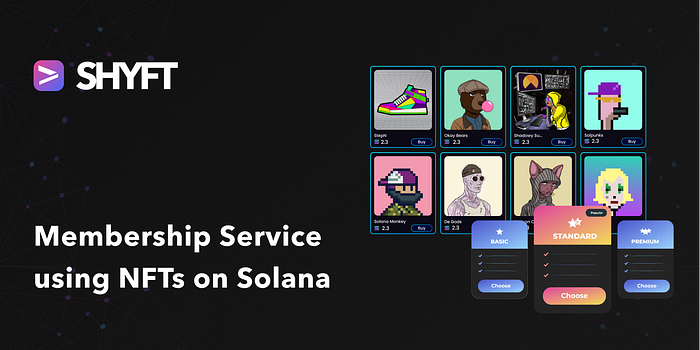
Sell membership NFTs, restrict access or grant special privileges on them, and renew memberships.
The world is currently witnessing a migration from Web 2.0 to Web 3.0. While most people do not have a clear idea of what this means, a number of entrepreneurs are already busy making the most out of the transition.
With the rise of Web3 technologies, people have realized that Non-Fungible Tokens (NFTs) are much more than just simple JPEGs on a blockchain. In today’s world, NFTs have a wide range of utilities such as NFT Gated Access, NFT Marketplace, NFT awards, NFT collections, and many more. Once such NFT utility may be Membership services using NFTs. In this series, let us see how we can provide users with Membership services using NFTs.
Read SHYFT Documentation here.
You can access the other parts of the series here:
Part 2: Create a new membership NFT.
Part 3: Renew or update an existing NFT membership
Pre-requisites
To get started, we will need a few things.
Authentication: Get your Shyft API key
x-api-key is an authentication parameter, which gives you access to SHYFT APIs. You can get your own API Key from the SHYFT website. Just signup with your email id here and you can get it for free.
Phantom Wallet
We will need the Phantom wallet browser extension, you can download it from the link below.
Once done, set up your Phantom wallet account. On-screen tips are available, which will guide you through setting up and getting started. You can also find a detailed guide related to this here.
Memberships: The Scenario
Let us consider the following scenario. Suppose there is a marketplace that sells its users certain things and charges in SOL. Now, there are two types of users in this marketplace, namely regular buyers, or buyers who occasionally visit or buy things from the marketplace, and subscribers, who are frequent visitors and buyers of the website.
The marketplace owner now decides to start a membership service for its regular users, where a user with membership to the marketplace is provided special offers and discounted prices for marketplace purchases. Now, on web2.0, this can be done by maintaining a centralized database of subscribers and their emails. However, on web3.0 there are several ways of implementing this. In this tutorial series, we will see how we can implement memberships with NFTs.
By the end of this tutorial series, we will see
- how we can provide a new membership to the marketplace users using NFTs
- how we can update the membership service
- how can we check the validity of the membership service and provide discounts accordingly.
Press enter or click to view image in full size
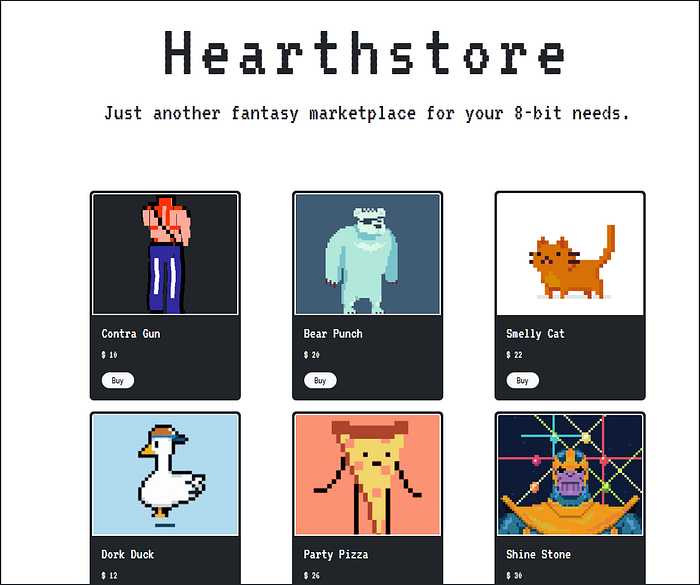
Marketplace with NFT-based Memberships.
Checking if a user has a subscription
According to the above-mentioned scenario, we assume that all the marketplace users are crypto-wallet holders, so we can mint NFTs directly to their wallets, as proof of their subscription to the marketplace. Let’s see how we can establish this within a few steps using SHYFT APIs. We have created a sample marketplace to illustrate this feature using react, but this can be implemented on any marketplace, be it digital or physical.
Now let us assume the store offers 3 types of subscription, namely a 3-month, 6-month, and a 9-month subscription. Any new user landing on the marketplace, or trying to sign in to the marketplace is asked to connect the wallet. Once connected, we use the user’s wallet address to verify if the user has a subscription to the store i.e. if the user holds a subscription NFT from the marketplace.
Press enter or click to view image in full size
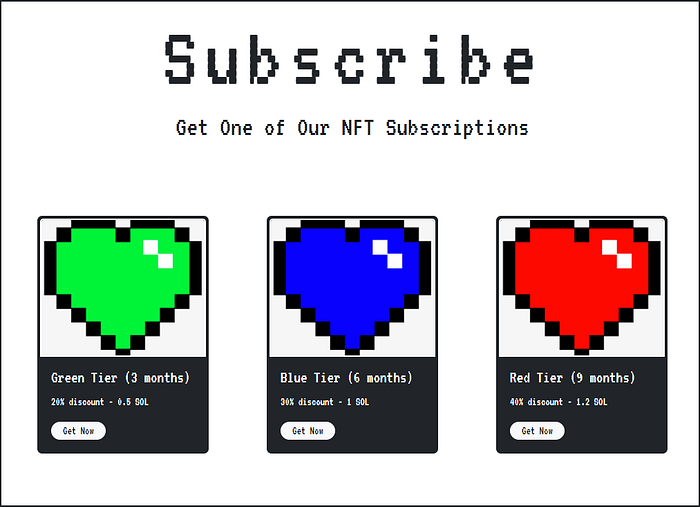
Membership options for the store described in the current scenario.
Getting a list of all NFTs
In order to maintain a subscription service for a marketplace, we have to keep track of whether or not a user has a subscription to the marketplace, and also the starting and ending date for the subscription. To establish this, we take advantage of NFT metadata. Whenever a user gets a subscription to the marketplace, an NFT is transferred to their crypto wallet, which contains the subscription details, the starting date and the ending date of the subscription.
Get Team Shyft’s stories in your inbox
Join Medium for free to get updates from this writer.
So whenever the user signs in i.e. connect their crypto wallet, we use SHYFT APIs to read a list of all NFTs present in the user wallet and verify if the user has a subscription NFT for the marketplace. We use SHYFT’s very own read_all API in order fetch a list of all NFTs with a particular update_authority.
The API endpoint used
GET https://api.shyft.to/sol/v1/nft/read_all?network=devnet&address=USERS_WALLET_ADDRESS&update_authority=WALLET_WITH_UPDATE_AUTH_FOR_SUBSCRIPTION_NFTSThis API accepts 3 parameters,
network: defines the Solana network instanceaddress: defines the user’s wallet address whose NFT list we are attempting to fetch.update_authority: This optional parameter if set to one particularwallet_addresswill only fetch the NFTs whoseupdate_authorityis this particular wallet address. In our case, thisupdate_authoritycan be thewallet_addressthat is used for minting the subscription NFTs.
Once the request is successfully executed the response should return a list of all the NFTs from the user’s wallet. The response should look somewhat like this.
{
  "success": true,
  "message": "Your all NFTs",
  "result": [
    {
      "name": "MRnft",
      "symbol": "QRNFT",
      "royalty": 20,
      "image_uri": "<https://nftstorage.link/ipfs/bafkreiclqyvz2zokfbrdcjv7j43fzcfh2nze4n6nro4n76xobfzy4w4naa>",
      "cached_image_uri": "<https://nftstorage.link/ipfs/bafkreiclqyvz2zokfbrdcjv7j43fzcfh2nze4n6nro4n76xobfzy4w4naa>",
      "metadata_uri": "<https://nftstorage.link/ipfs/bafkreig3eeamwuupdjnlufa4ld24bh2x2apshvk46xrfooysa5k3ygkdfa>",
      "description": "generated by QRaftNFT",
      "update_authority": "BvzKvn6nUUAYtKu2pH3h5SbUkUNcRPQawg4bURBiojJx",
      "attributes": {
        "speed": 100,
        "aggression": "crazy",
        "energy": "very high"
      },
      "attributes_array": [
        {
          "trait_type": "speed",
          "value": 100
        },
        {
          "trait_type": "aggression",
          "value": "crazy"
        },
        {
          "trait_type": "energy",
          "value": "very high"
        }
      ],
      "external_url": "<https://shyft.to>",
      "mint": "2EAMbzr6NKsmzBvoL8cAyndAPPFJgKH8VUrvPdTb9C1J",
      "owner": "BvzKvn6nUUAYtKu2pH3h5SbUkUNcRPQawg4bURBiojJx",
      "creators": [
        {
          "address": "J2tQNi4CSusmUs6pvfP26jbXe75DBbTJD8w4pTNyUWMs",
          "verified": 1,
          "share": 100
        }
      ]
    },
    {
      "name": "Shyft Founders",
      "symbol": "SF",
      "royalty": 5,
      "image_uri": "<https://nftstorage.link/ipfs/bafkreifmnberecudicu36bjwobhh4x57oacmt4z4qq6ulyyb4jwpdmr6de>",
      "cached_image_uri": "<https://nftstorage.link/ipfs/bafkreifmnberecudicu36bjwobhh4x57oacmt4z4qq6ulyyb4jwpdmr6de>",
      "metadata_uri": "<https://nftstorage.link/ipfs/bafkreiaquw56wi35rggsh3jefna6gnfuuxnwqgp4jilzahbqla2y6ui7la>",
      "description": "some description",
      "update_authority": "BvzKvn6nUUAYtKu2pH3h5SbUkUNcRPQawg4bURBiojJx",
      "attributes": {
        "attack": 200,
        "aggression": "ok",
        "energy": "over 900"
      },
      "attributes_array": [
        {
          "trait_type": "attack",
          "value": 200
        },
        {
          "trait_type": "aggression",
          "value": "ok"
        },
        {
          "trait_type": "energy",
          "value": "over 900"
        }
      ],
      "external_url": "",
      "mint": "5dqRZ7nGBFpU7yc4ZycvfSapzbHwwENxSF967rg5y9b9",
      "owner": "BvzKvn6nUUAYtKu2pH3h5SbUkUNcRPQawg4bURBiojJx",
      "creators": [
        {
          "address": "BvzKvn6nUUAYtKu2pH3h5SbUkUNcRPQawg4bURBiojJx",
          "verified": 1,
          "share": 100
        }
      ]
    }
  ]
}
Once we have this, we should have the list of NFTs in the result field of the response, let us see how we can verify a subscription.
Checking and verifying a subscription
Once we have the list of all NFTs, we can use a simple forEach , or any other loop to iterate over the NFTs and check if a subscription NFT is present in the wallet. We have used name and update_authority of the NFT to recognize and authenticate the membership NFTs but you can use any other field of your choice.
const allNfts = response.data.result; //array of all NFTs
allNfts.forEach(element => {
 if(element.name === SUBSCRIPTION_NFT_NAME && element.update_authority=== SUBSCRIPTION_AUTH)
 {
   //checking if an NFT is a subscription NFT using name and update_auth
 }
})
Once we find a subscription NFT in the wallet, the next step is to check if the subscription is valid i.e. the subscription end_date mentioned in the NFT has not passed the current date(or today’s date). The subscription end_date is available in the metadata of the response of the subscription NFT.
We will cover how to create this metadata in Part 2.
var dateToday = new Date(new Date().toISOString().slice(0, 10));
var dateExpiry = new Date(element.attributes.end_date); // subscription expiry date from NFT metadata
var diffDays = parseInt((dateExpiry - dateToday) / (1000 * 60 * 60 * 24), 10);
/* diffDays returns the difference between today's date and the expiry date. If diffDays is less than 0, that would imply that dateToday has crossed the expiry date and the subscription has expired. */
if(diffDays>0)
{
  // perform actions that are required if the subscription has expired, for example
  // redirecting the user to the membership page.
}
else
{
 // perform actions that are required when the subscription is active, for example keeping
 // track of the subscription details or providing discounts
}
Once validated, we can keep track of the user’s active subscription details using session data, using browser cookies, or any other method of your choice.
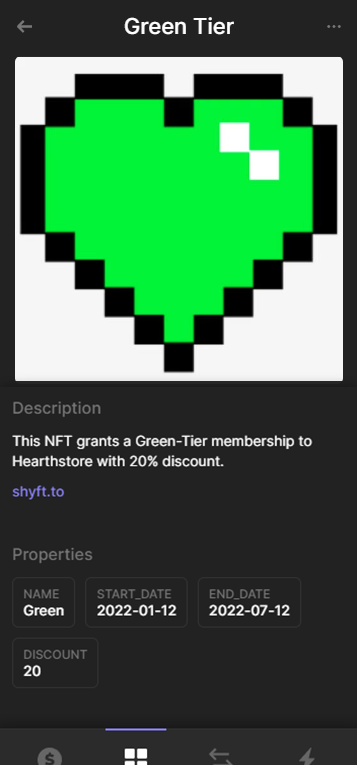
A new membership NFT with start_date,end_date, & other subscription details
So, that’s pretty much everything about this blog where we see how we can check and validate an user’s subscription, based on NFTs using SHYFT APIs. In the next tutorial in this series, we will see how we can provide a new user with a membership to the marketplace using NFTs using SHYFT APIs. Stay tuned!
Also, if you want to follow along with this tutorial, check out our GitHub repo of this project here.
Up next: Starting a new membership service using NFTs.
Resources
Join our Discord.